
For therapy practices
Managing your practice, now simpler.
Therapy practice management software designed to simplify your workflow. Organize session records, scheduling, and billing so you can focus on what matters most — your clients.
- Sessions
- Session Notes
- Session Blocks
- Reports
Tools that simplify your practice
A comprehensive solution designed for your mental health practice.
Session Notes & Records
Secure, structured session documentation with evolving clinical histories for each client.
Self-Service Scheduling
Let your clients book and manage their sessions through a dedicated app — no phone calls needed.
Privacy & Confidentiality
Data encryption and secure storage to ensure complete confidentiality of sensitive client information.
Billing & Payments
Track sessions, fees, and payments in an organized, paperless system with credit package support.
Smart Reminders
Automated appointment reminders and follow-ups to reduce no-shows and keep your schedule full.
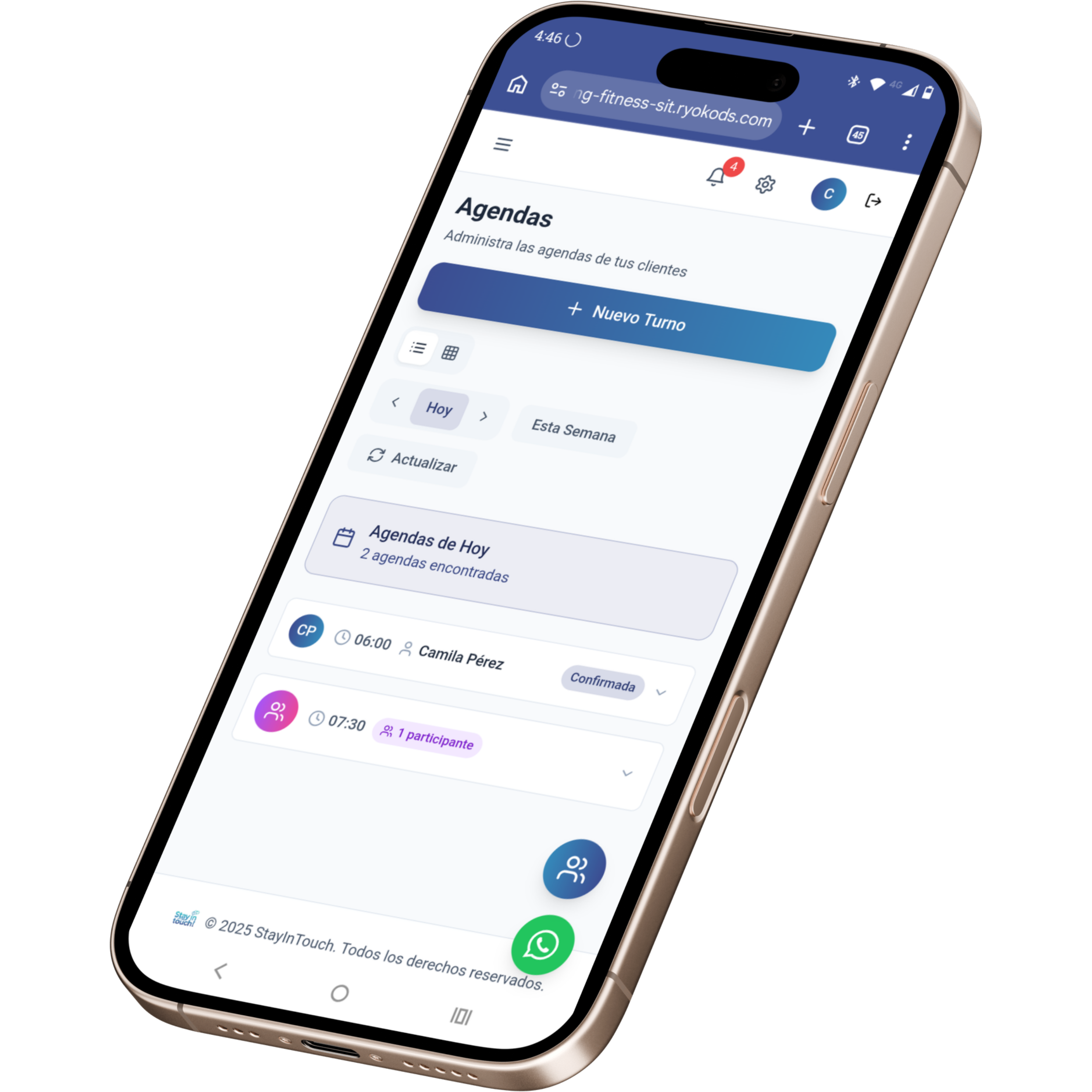
Designed for mental health professionals
A complete platform that adapts to your therapeutic workflow, with all the tools you need in one place.
Session Notes & Records
Self-Service Scheduling
Privacy & Confidentiality
Billing & Payments
See Siimplo running your practice
Every module, exactly as you and your team will use it.
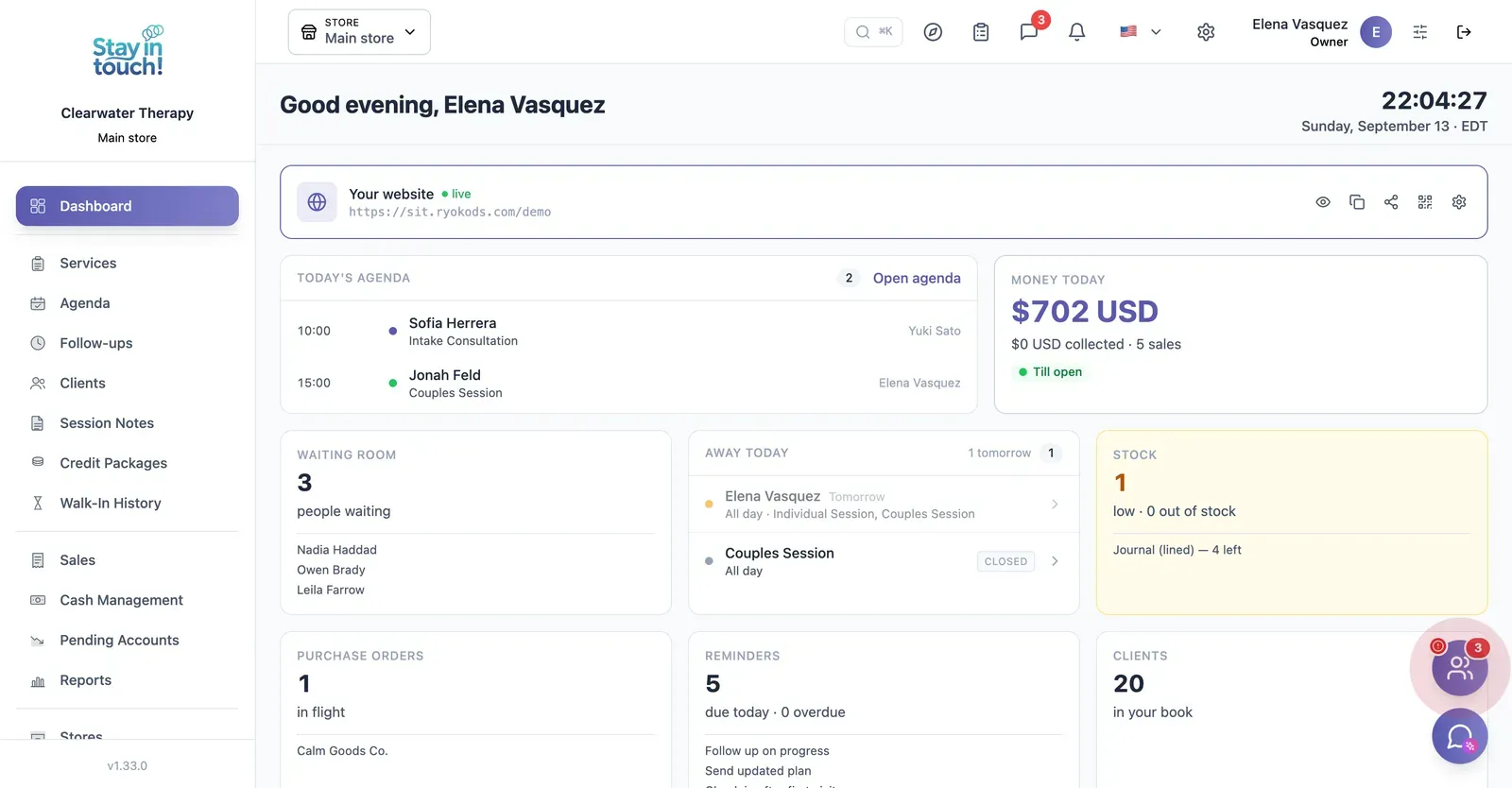
Dashboard
Today's sessions, your active client count and the intake link new clients use to book a first appointment.
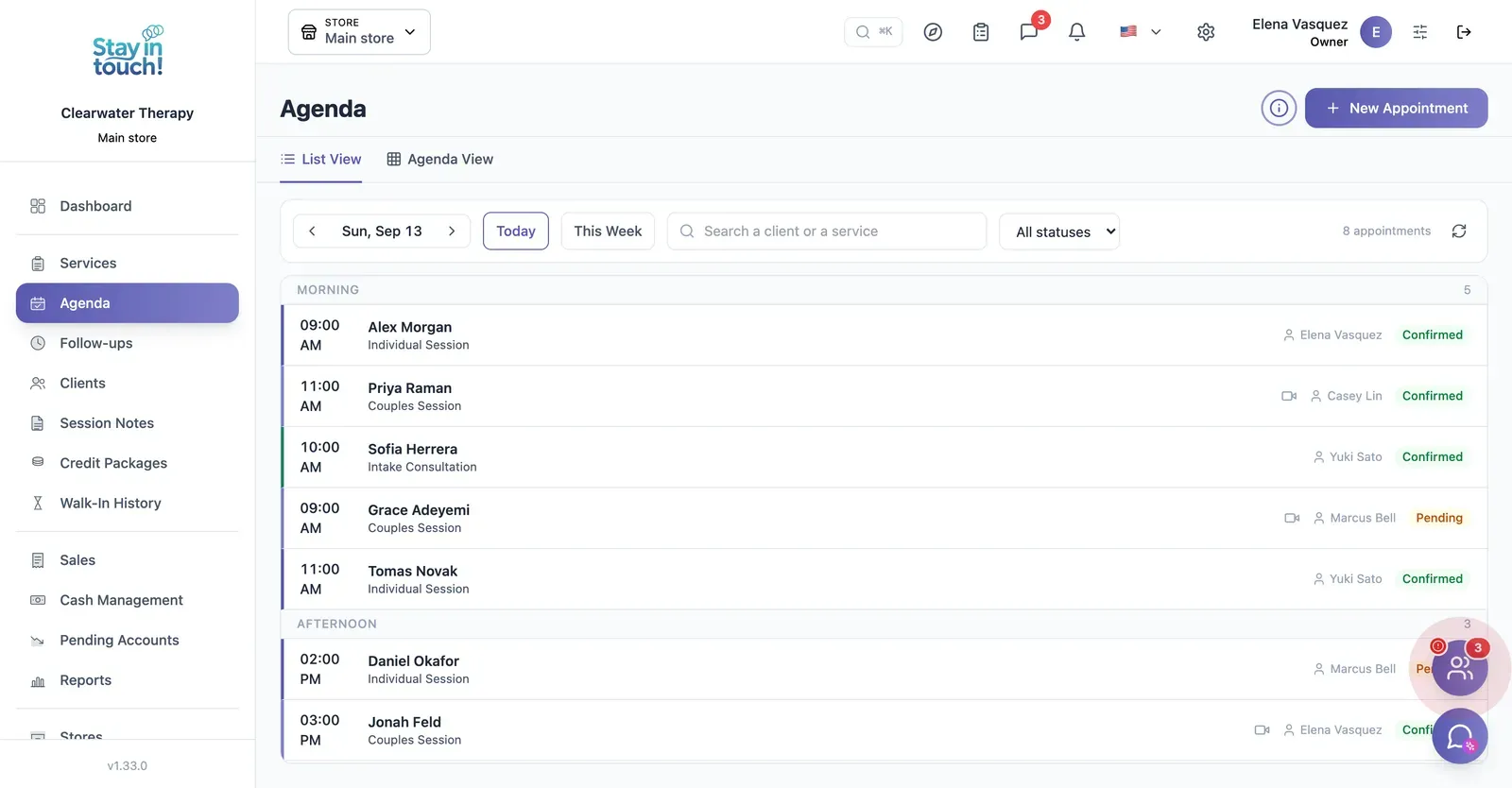
Sessions
Individual, couples, intake and group sessions across the day, with the practitioner assigned and confirmation status.
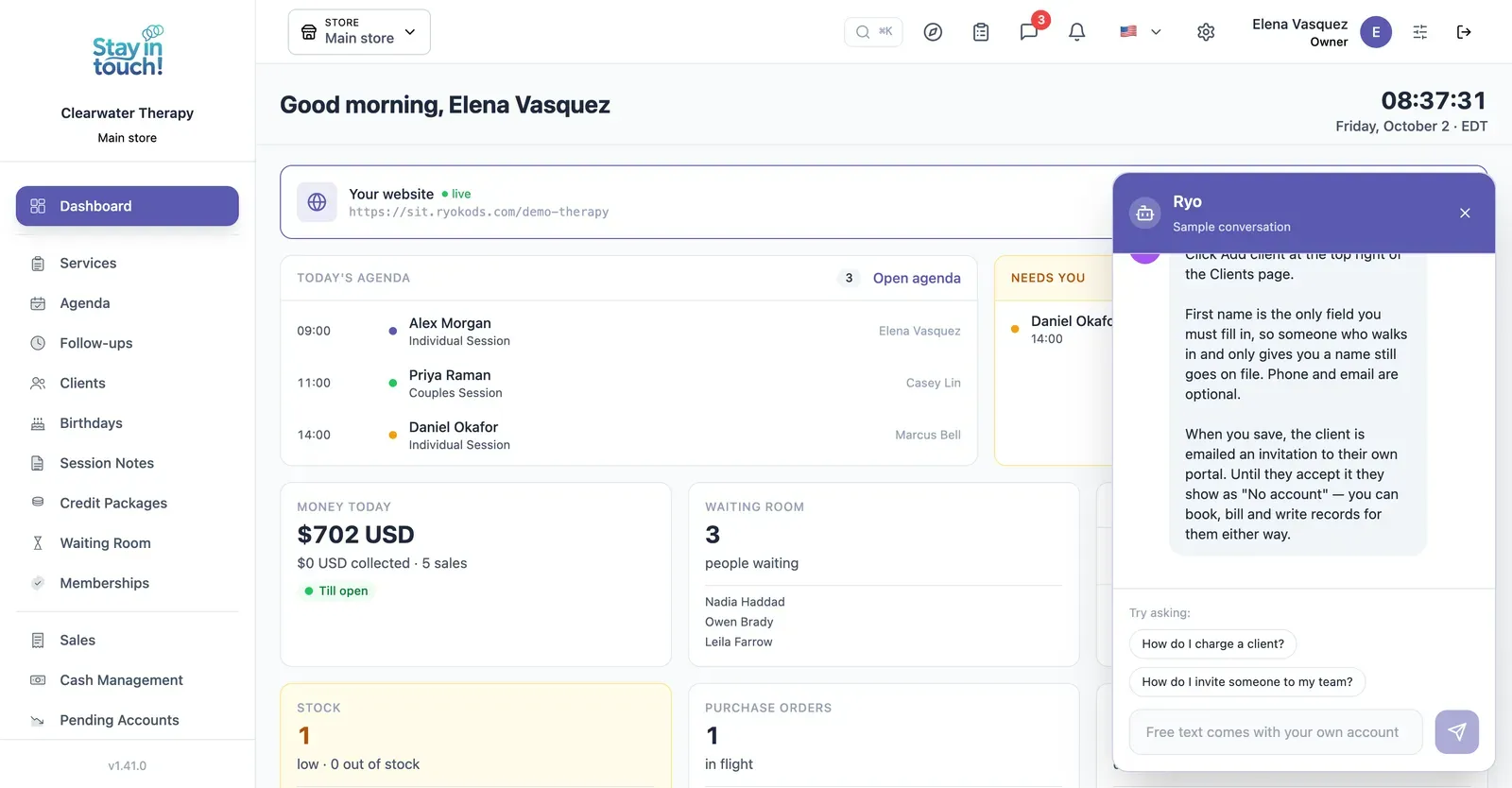
Ryo, the AI assistant
Ask in your own words and it walks you through Siimplo step by step; it also reads your real schedule and drafts the appointment for you to confirm.
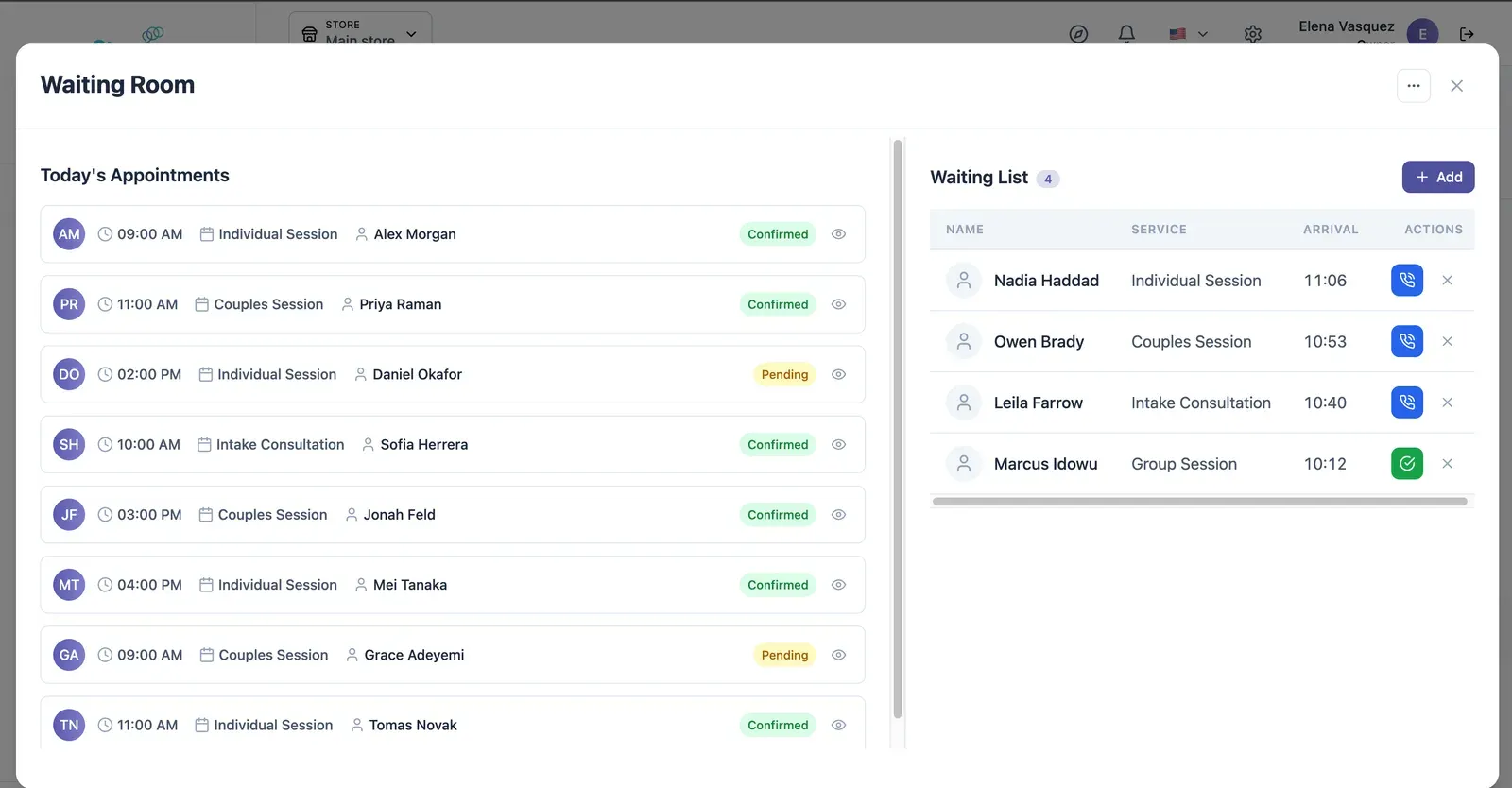
Live Waiting Room
Today's appointments on one side, who has arrived on the other — call the next one in with a single click.
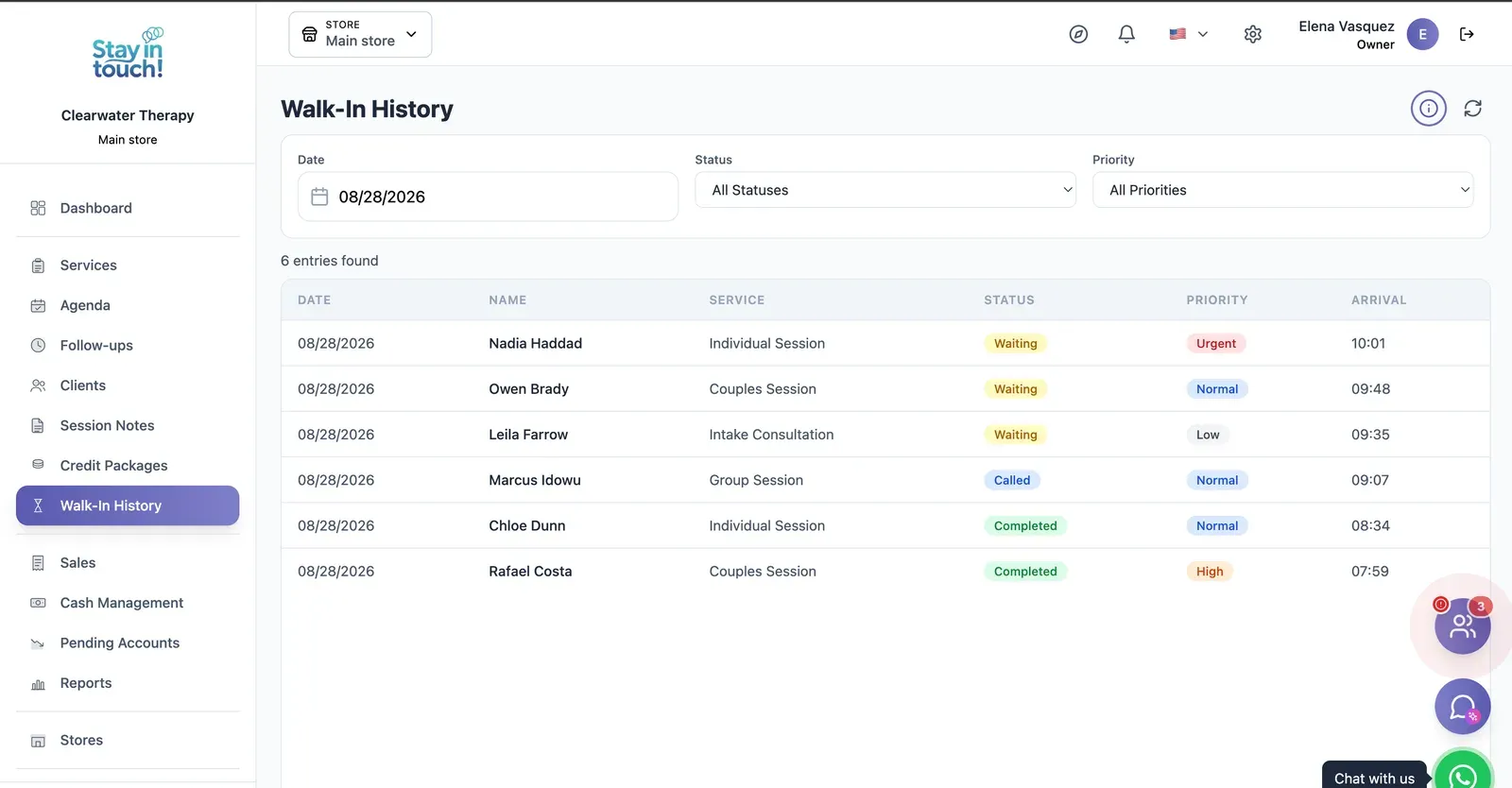
Waiting Room Log
A dated record of arrivals and how long each client waited, kept for every session.
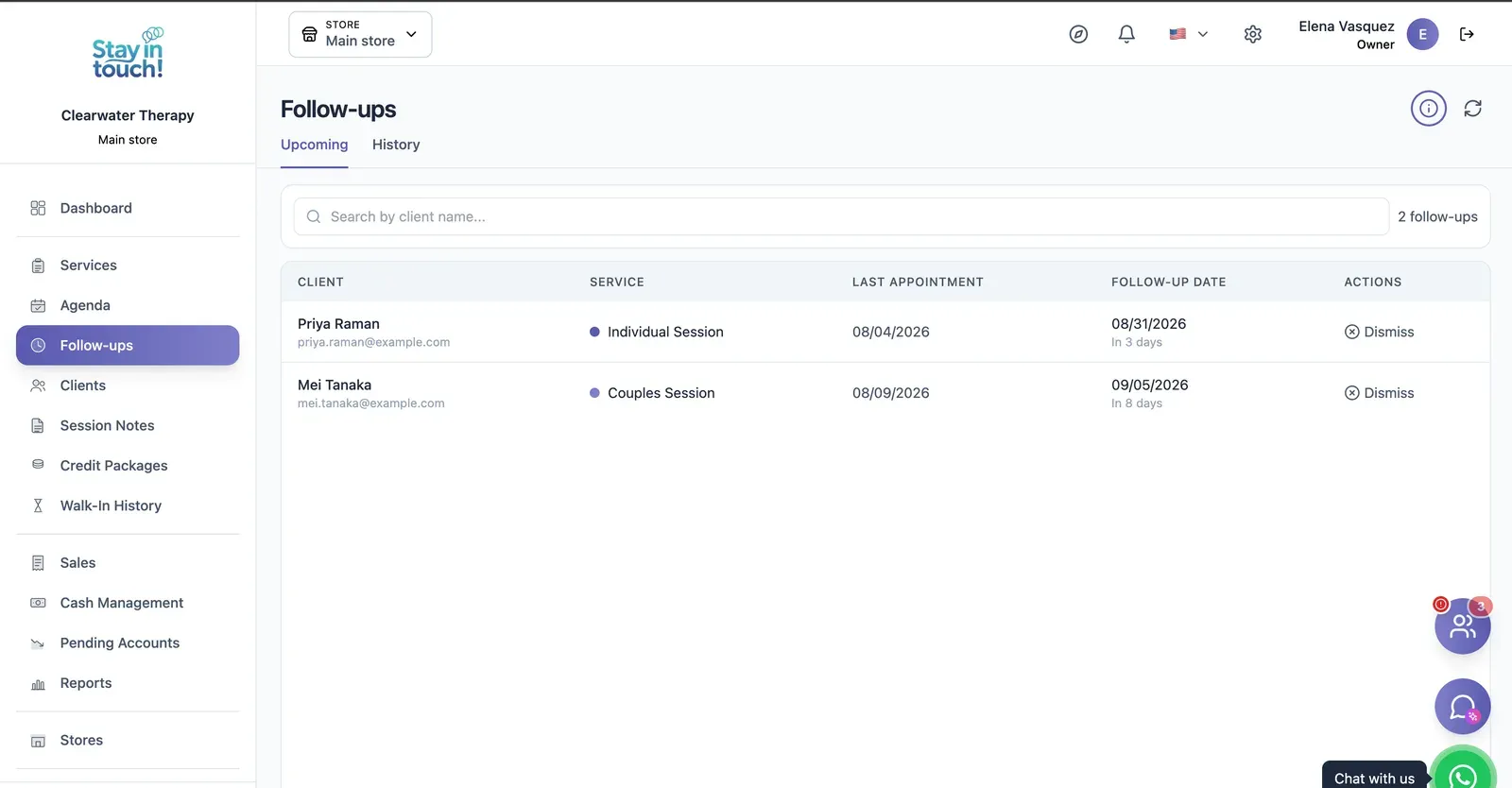
Follow-ups
Who is due back and when — post-visit checks and recalls queued automatically instead of living in someone's head.
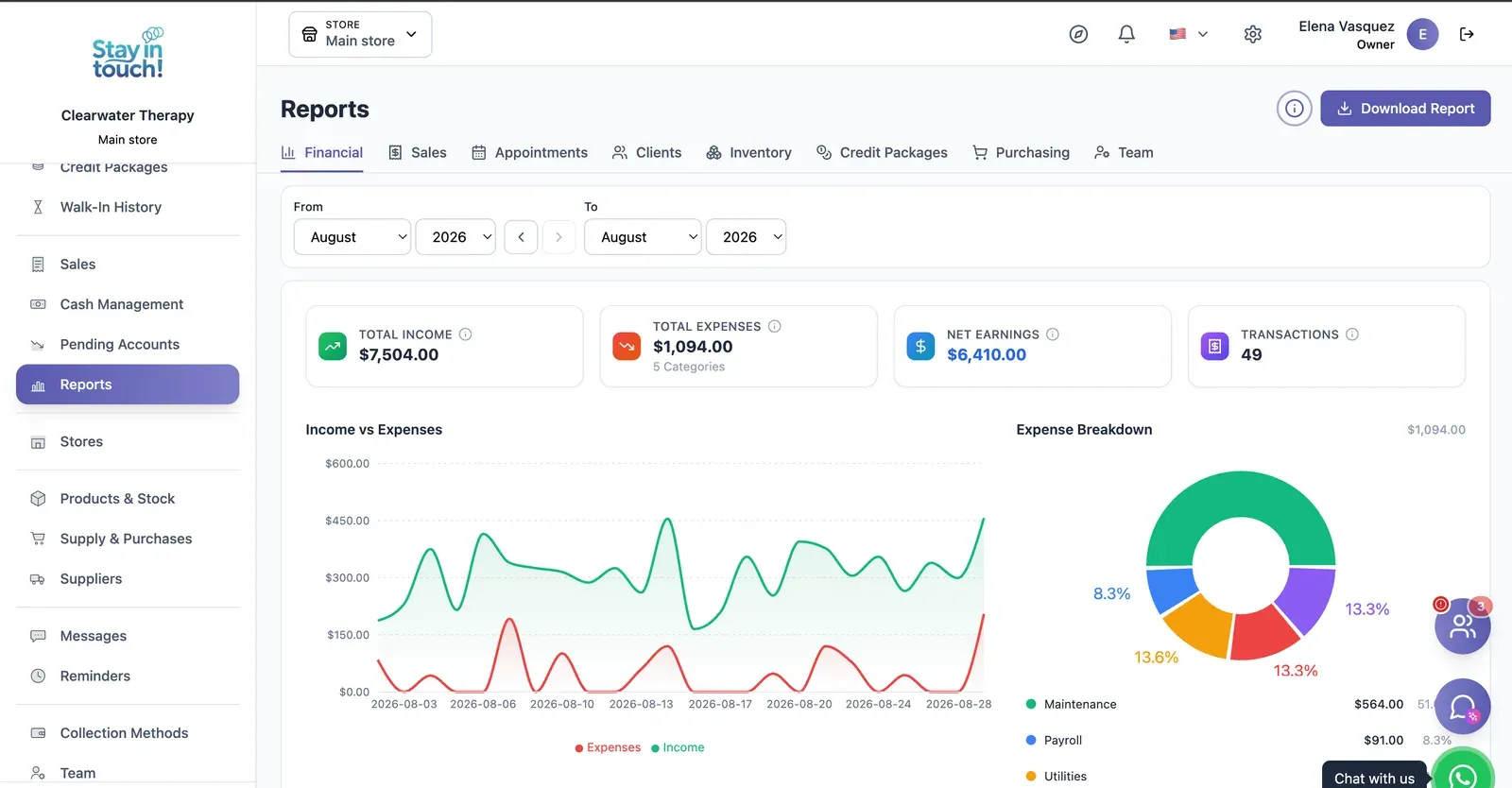
Reports
Revenue, expenses and net profit for any date range, with a trend chart, a category breakdown and a downloadable report.
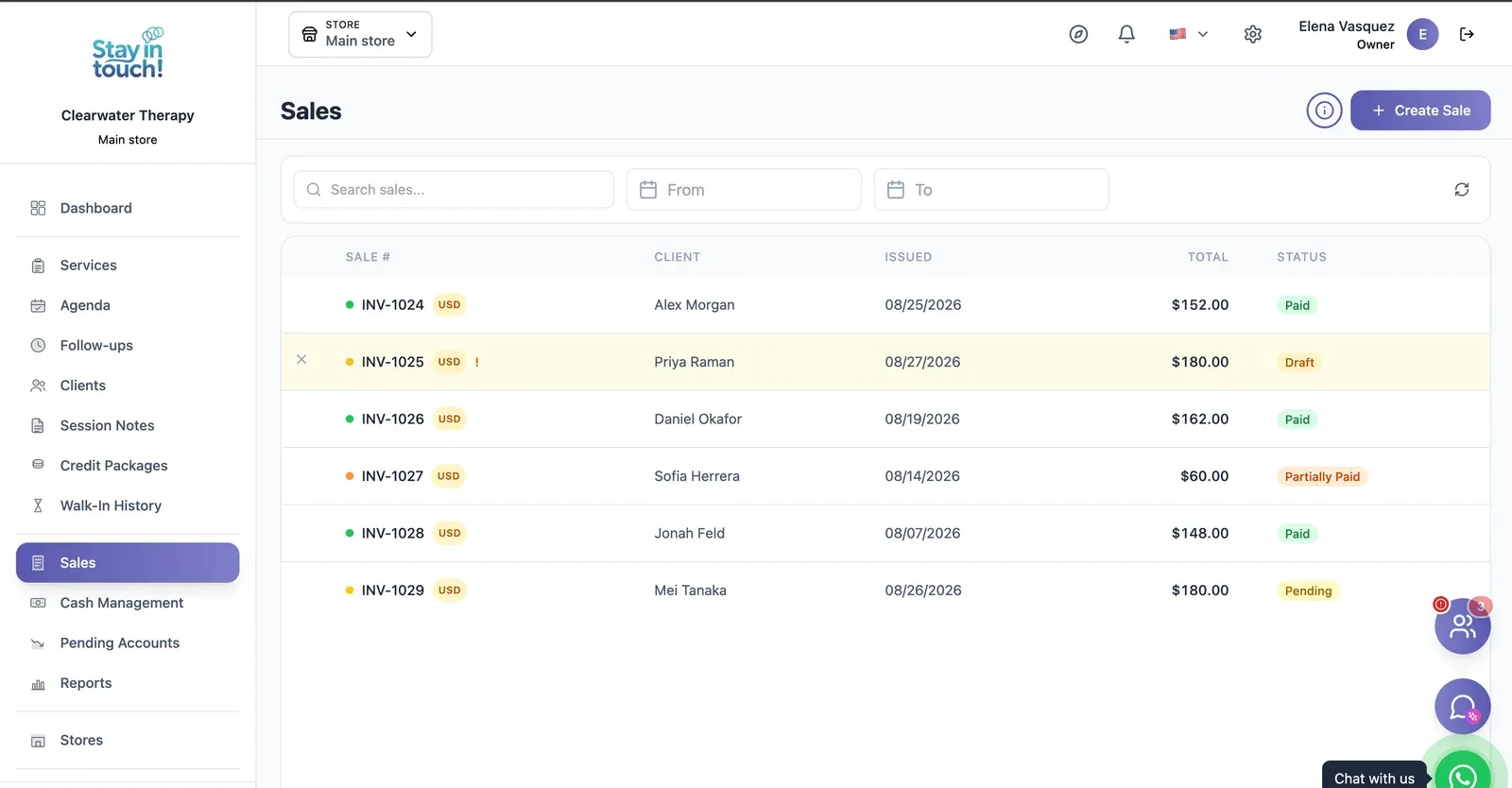
Sales & Invoices
Every invoice in one ledger — paid, partially paid, pending or draft — with the register built into the same screen.
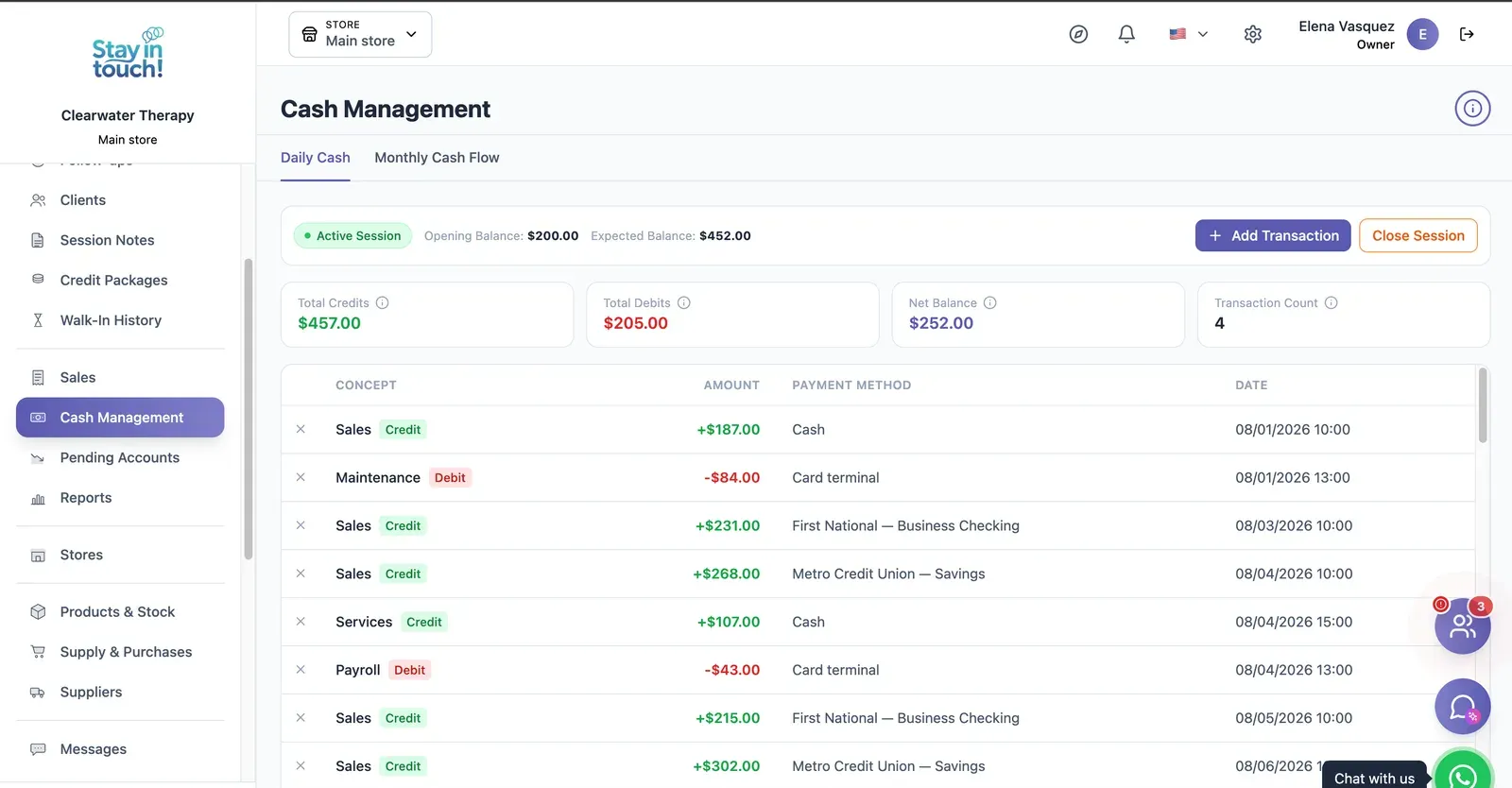
Cash Control
Open and close the register with opening and expected balances, income, expenses and every movement tagged by payment method.
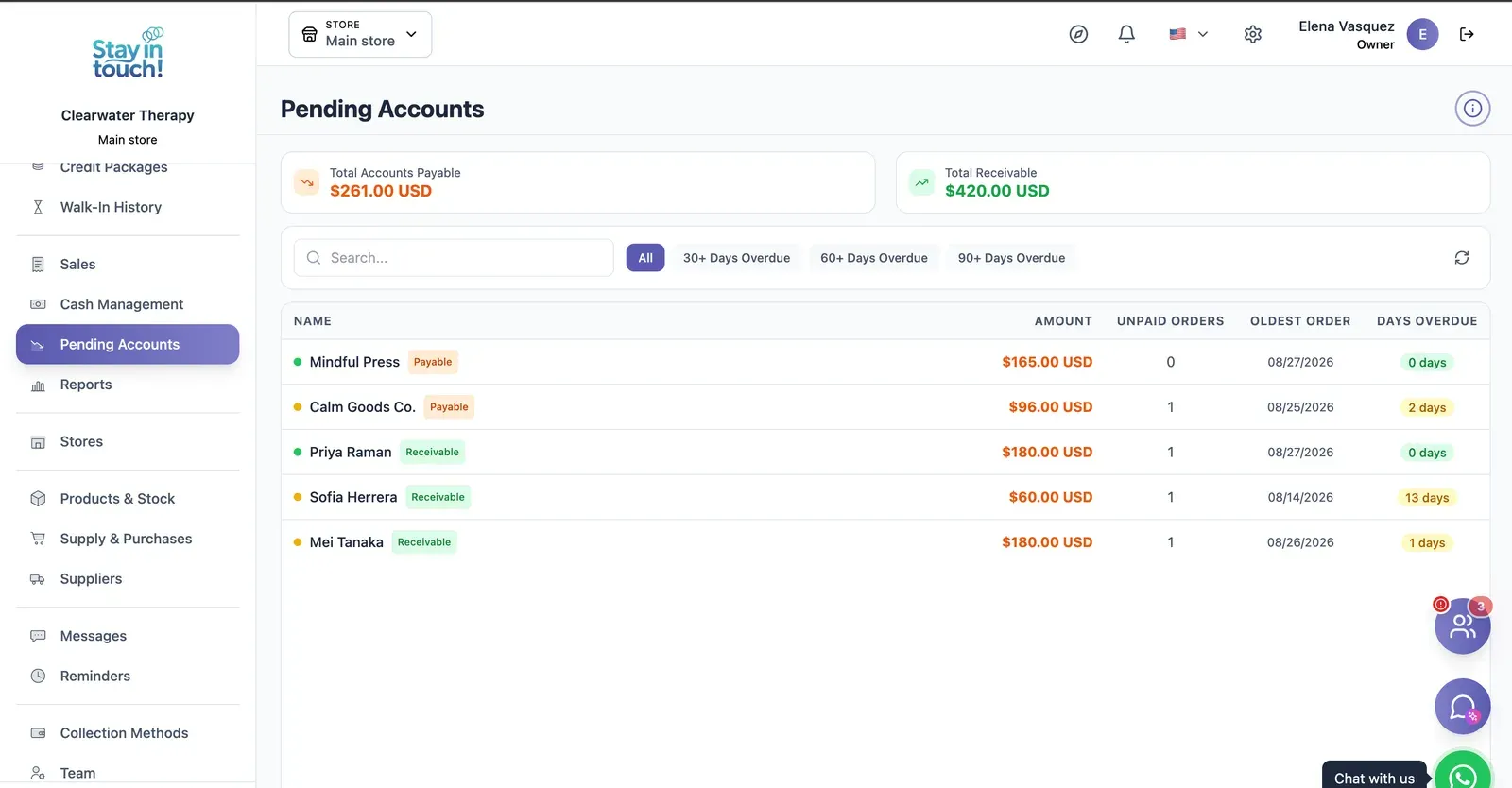
Payables & Receivables
What you owe and what you're owed, aged past 30, 60 and 90 days, with the overdue count on every row.
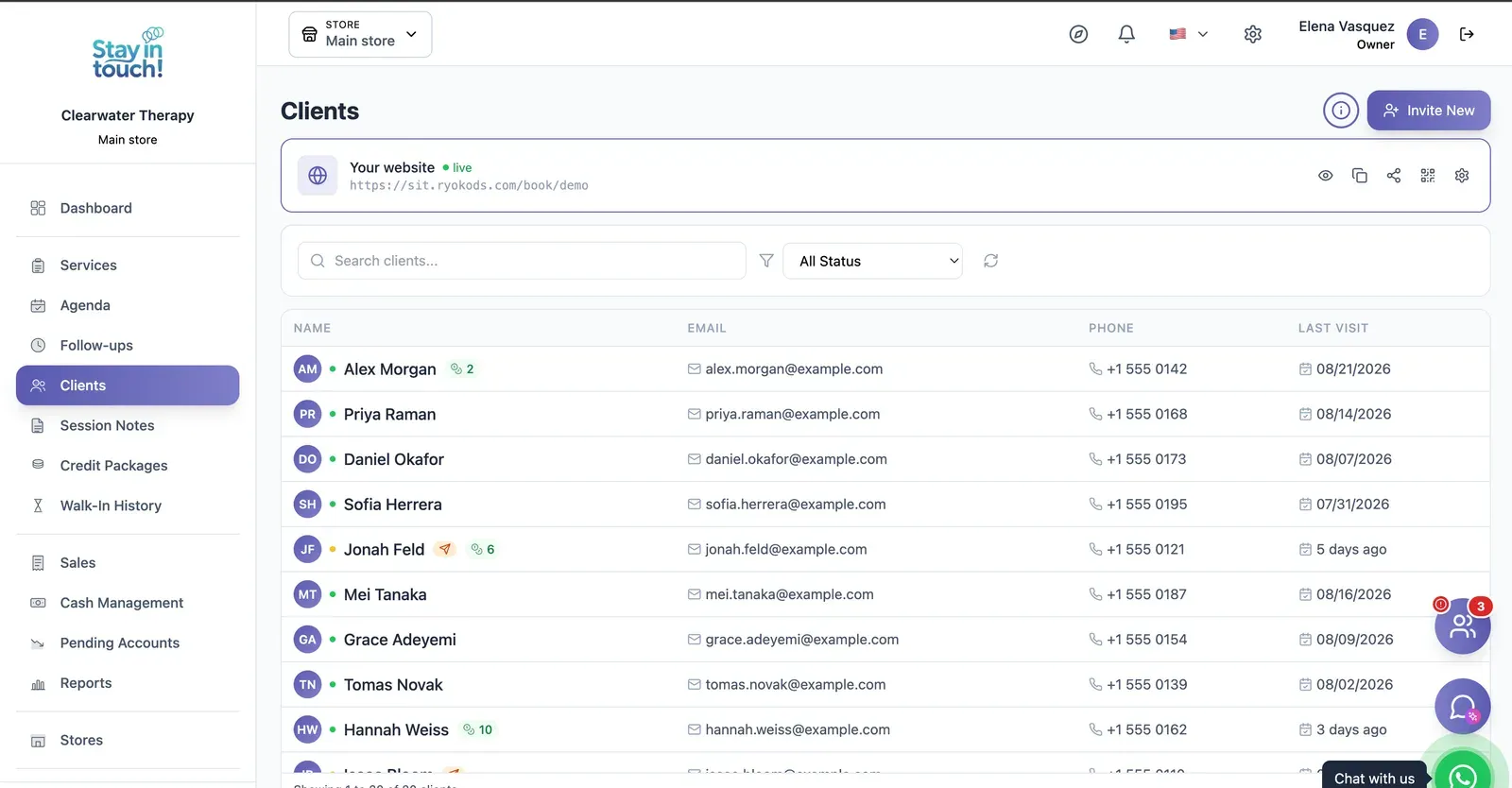
Clients
Your caseload with contact details, remaining session credits and status, searchable and invitable in one click.
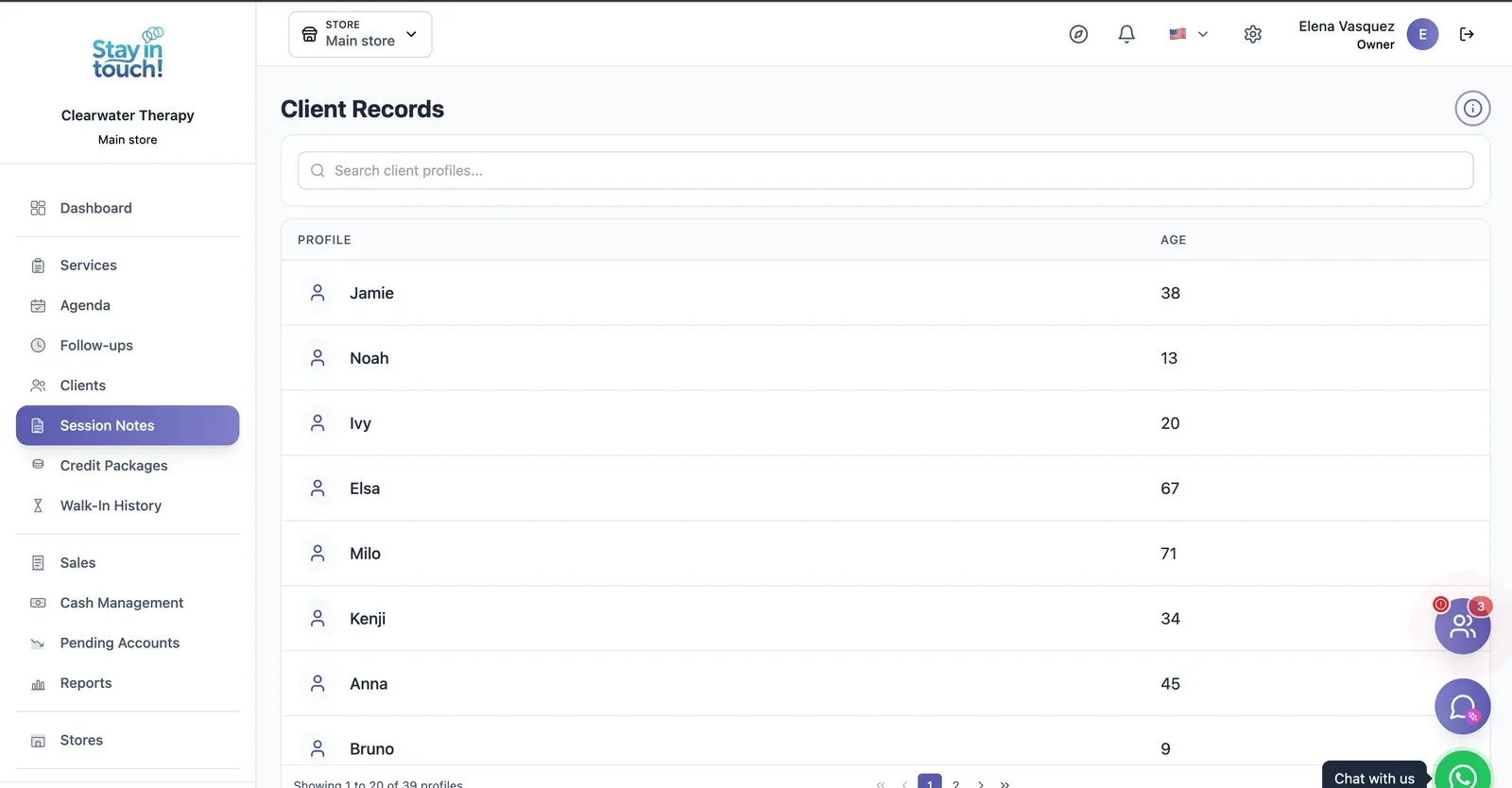
Session Notes
A private clinical record per client, session by session, searchable across your whole caseload.
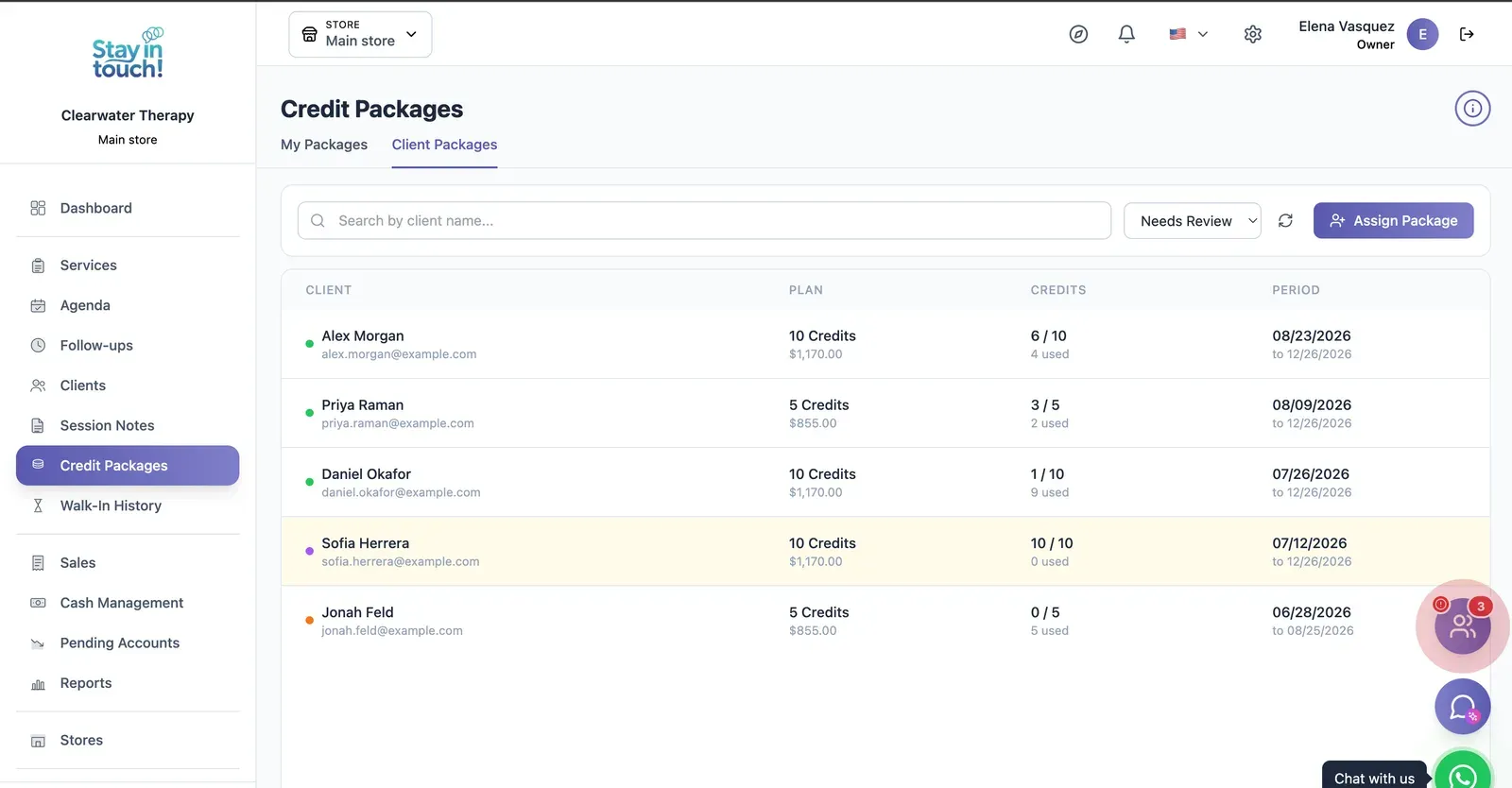
Session Blocks
Prepaid blocks of sessions per client with credits used, credits left and validity — flagged when they need renewing.
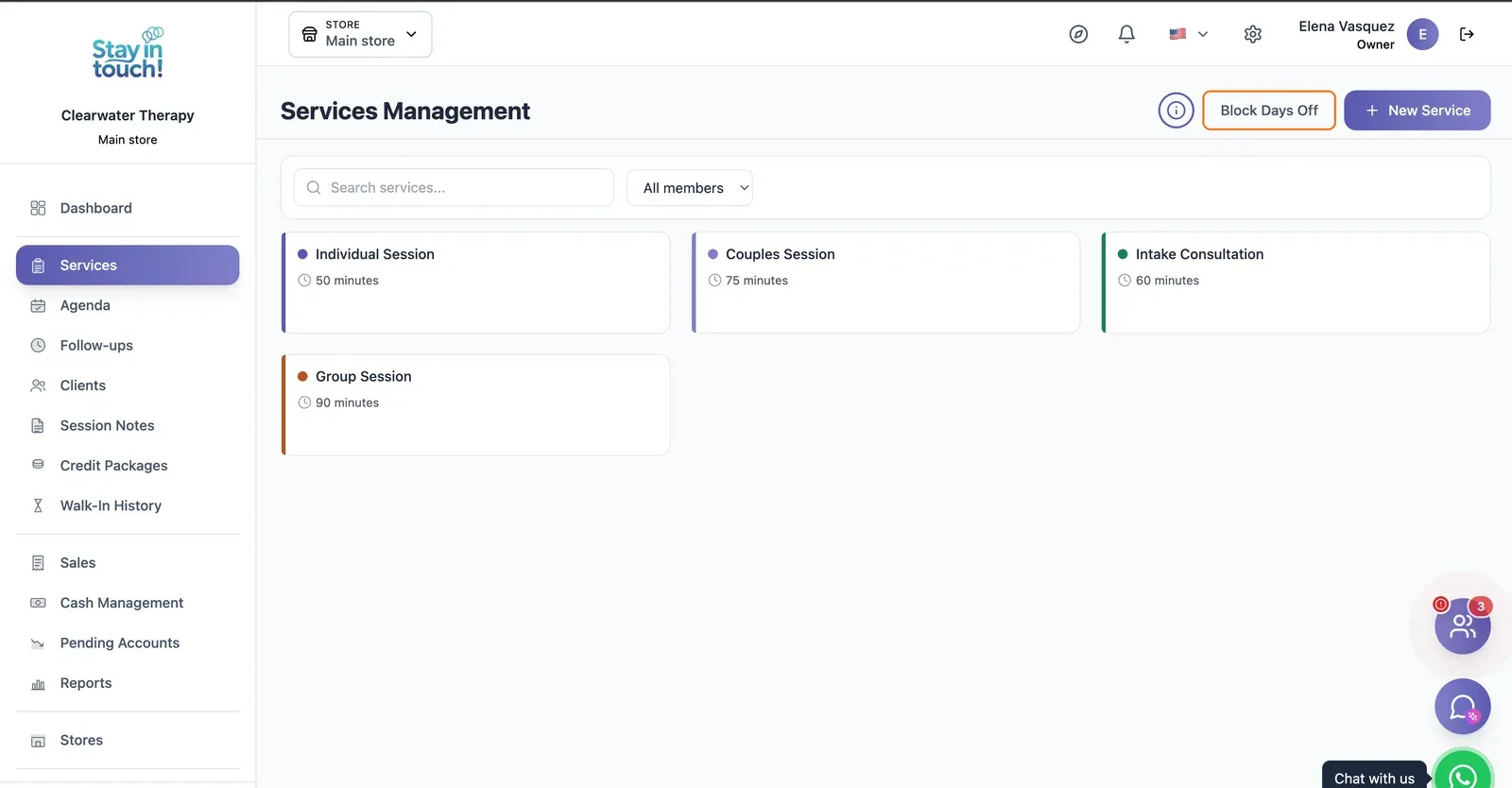
Session Types
Individual, couples, intake and group sessions, each with its own length, colour and practitioner.
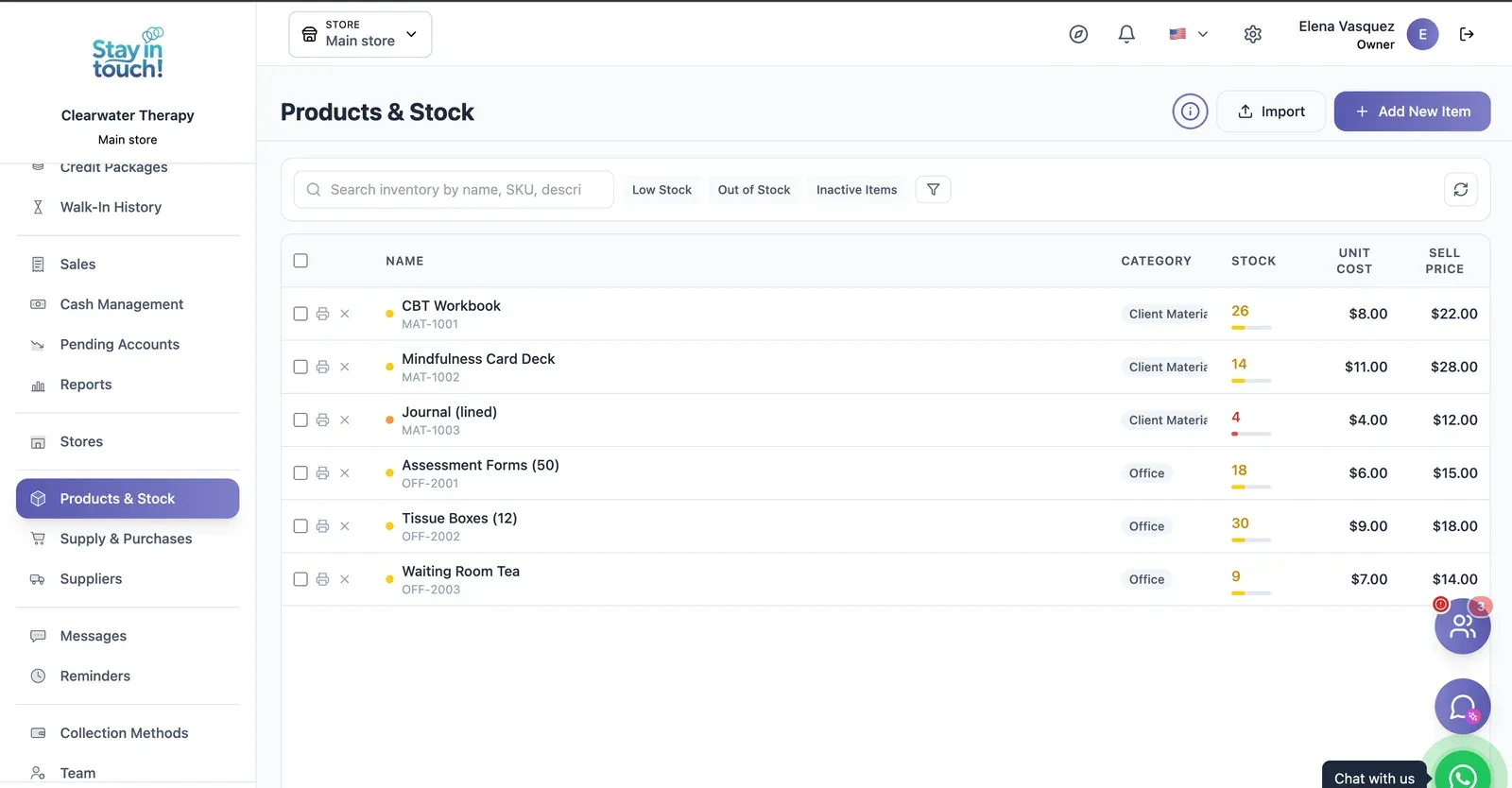
Products & Stock
SKU-level stock with cost and sale price, colour-coded levels that flag what's running low, and CSV import.
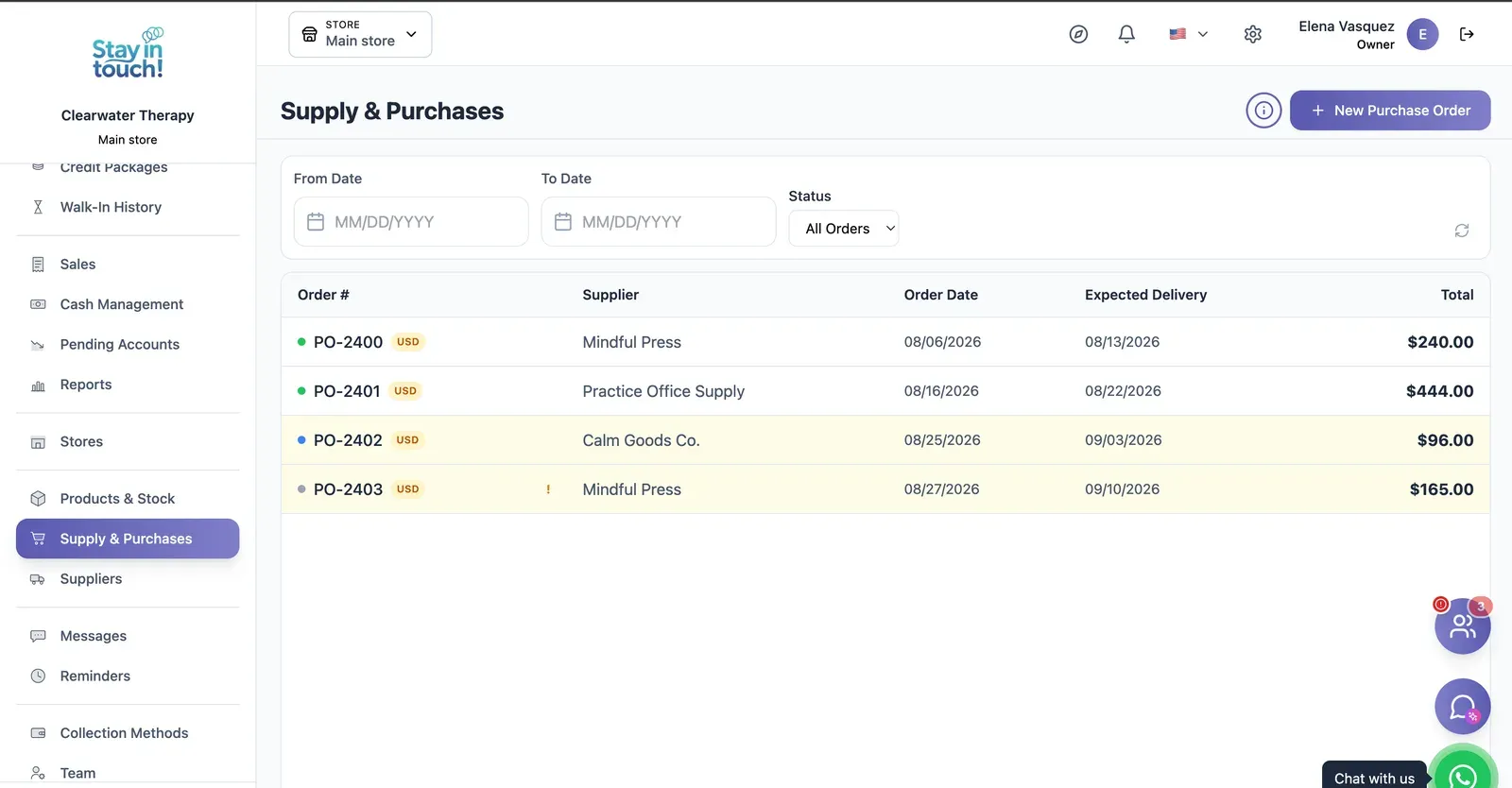
Purchase Orders
Track what you've ordered from whom, when it was placed and when it's due — with late deliveries flagged.
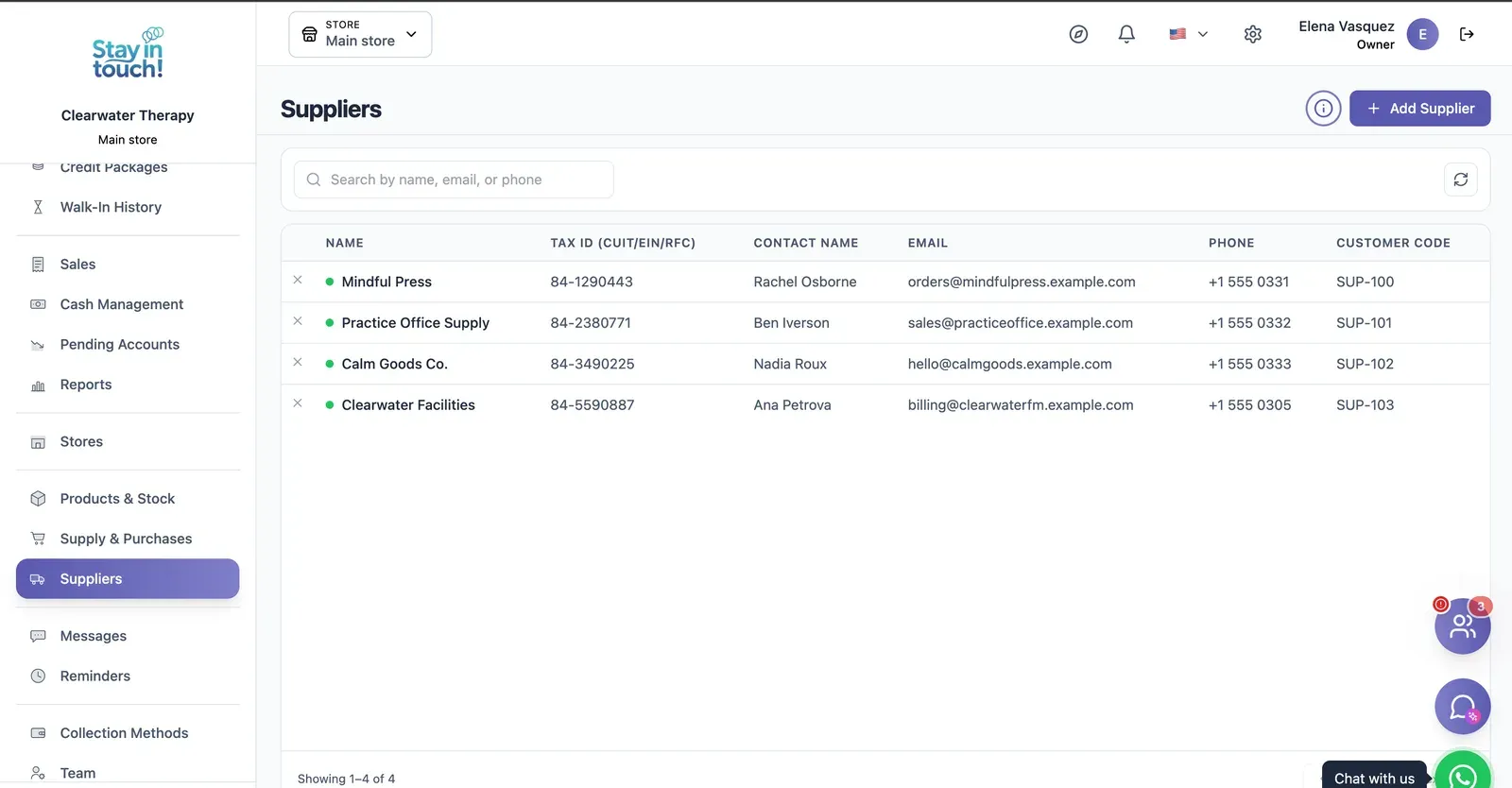
Suppliers
Your vendor book with tax ID, contact person, ordering email and internal supplier code.
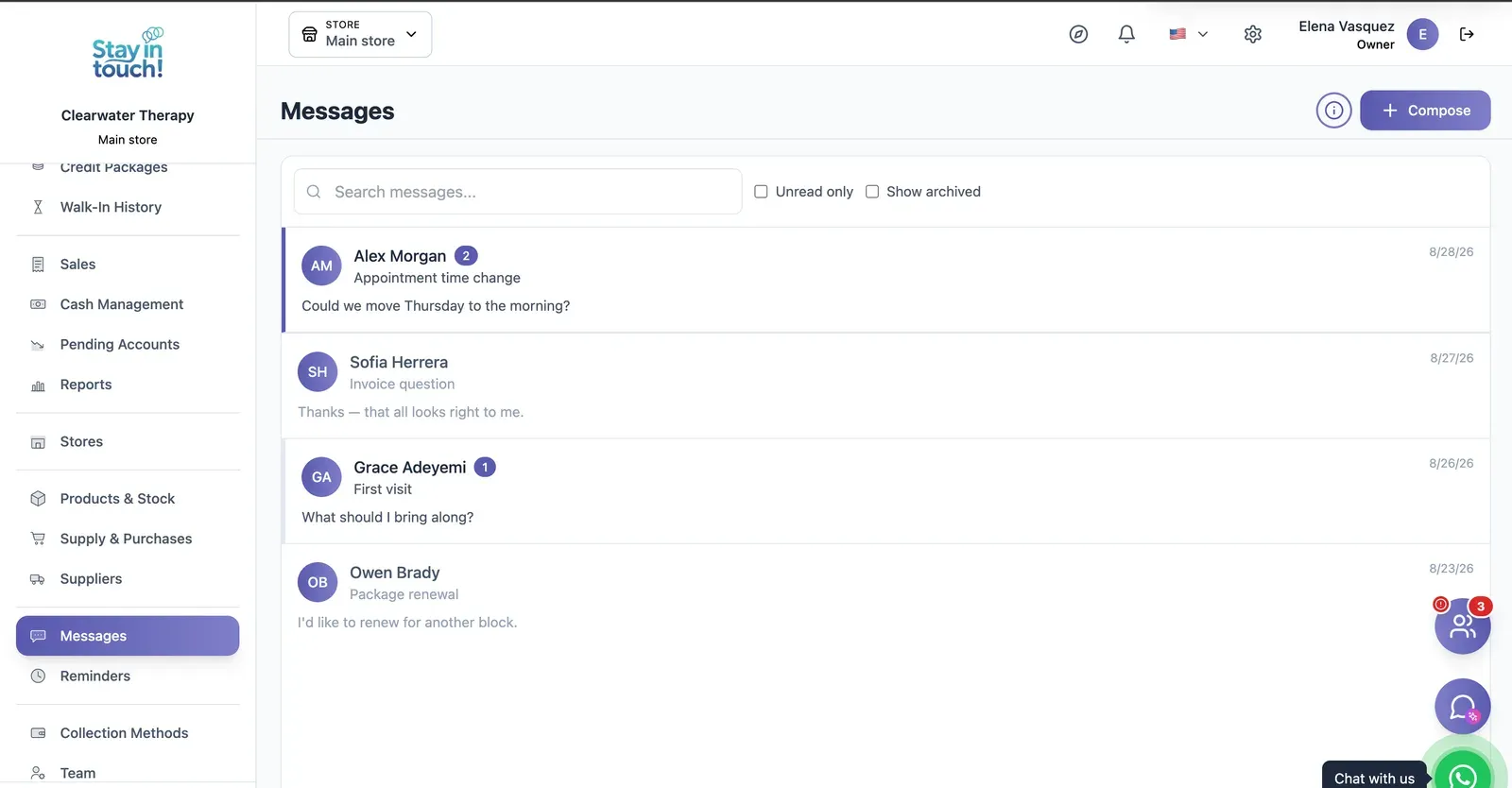
Messages
Client conversations kept in the record instead of scattered across personal phones, with unread counts and archiving.
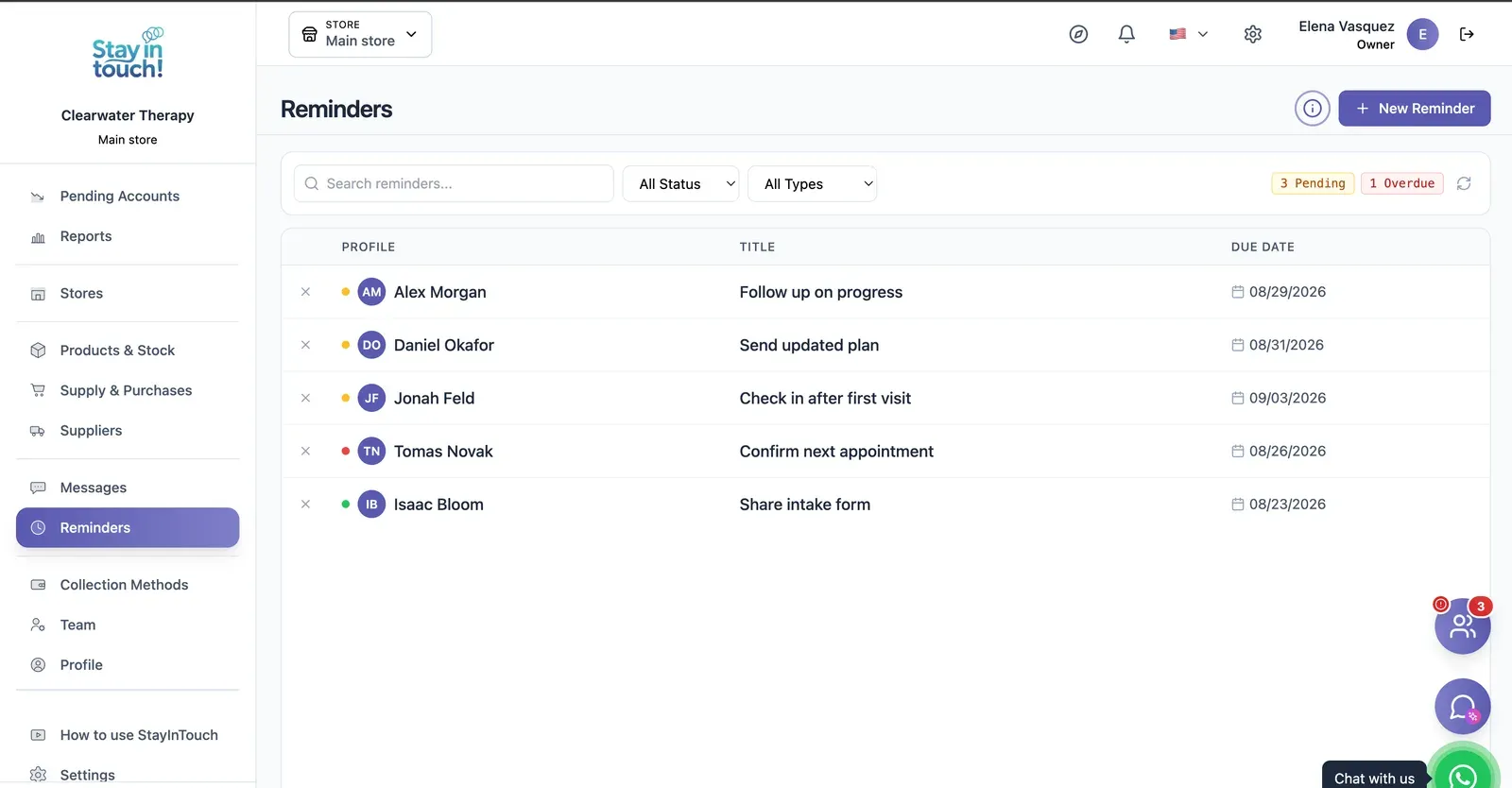
Reminders
Follow-up tasks tied to a client with due dates, so “I'll call them back” becomes something you can actually track.
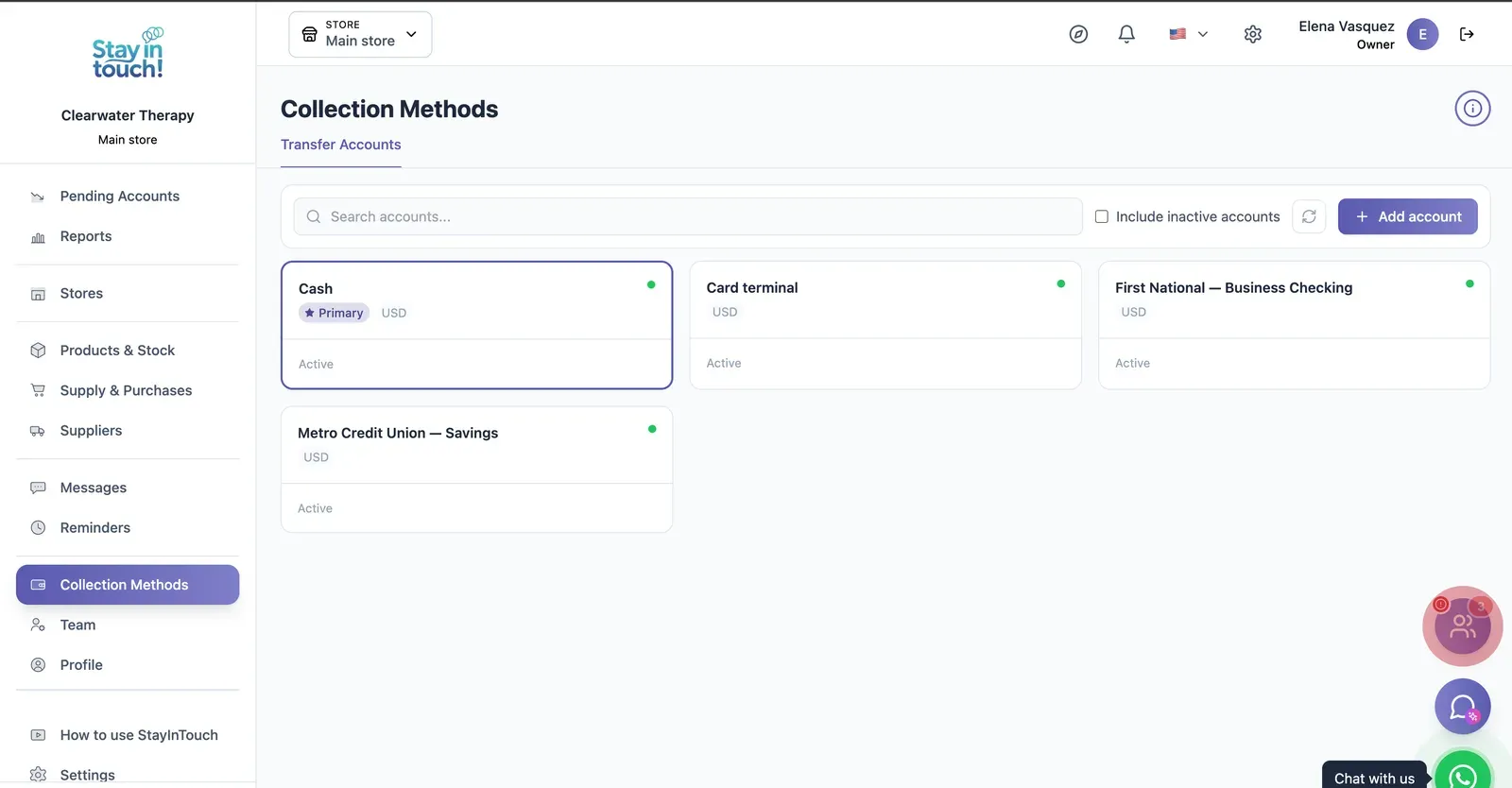
Payment Methods
Every way you collect — cash, card terminal, bank accounts — each with its currency and active state.
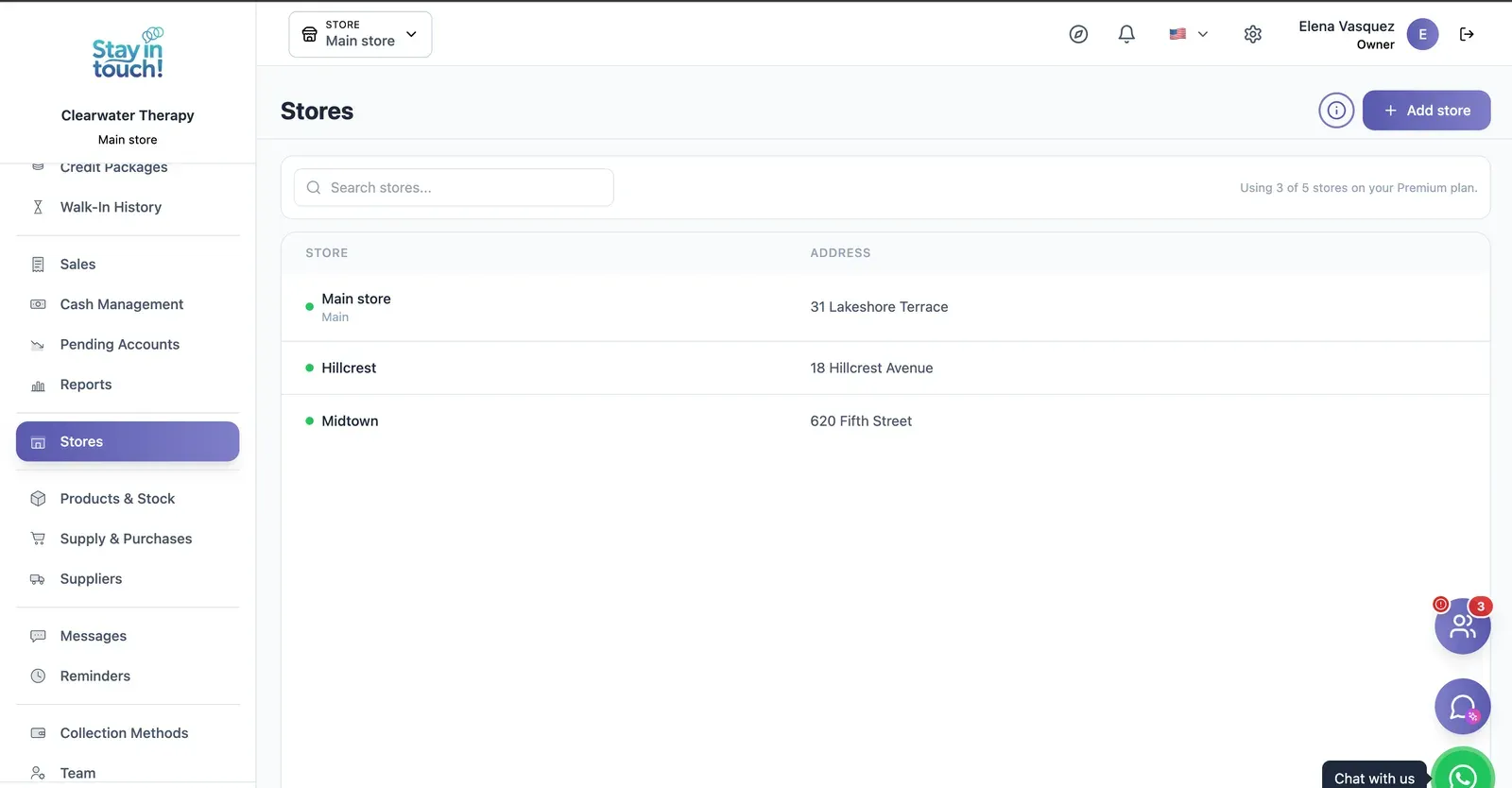
Multi-store
Run every store from one account on the top plan, each with its own team, stock and register.
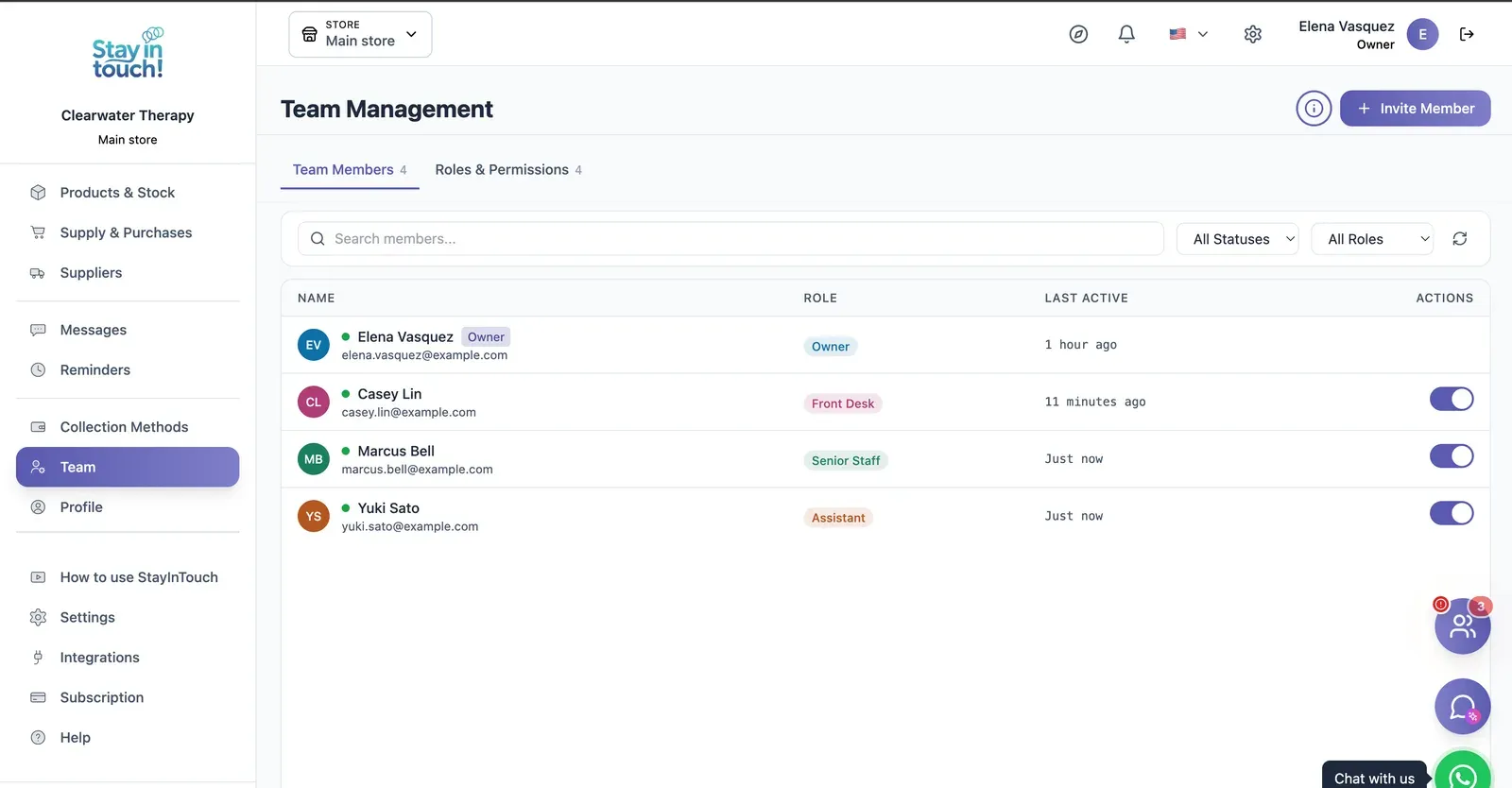
Team & Permissions
Your staff roster with roles, last activity and access toggles, plus a permissions tab as the business grows.
Screen 1 of 22
Website included
Your own website, free from day one
Every Siimplo account publishes a page for your business: your services, online booking and your catalog — no designer, no hosting.
Your services on display, always up to date
Clients book themselves, 24/7
Product catalog with prices
Automatic messages
What reaches your client
Not sample copy: these are the approved templates the platform sends, exactly as they go out.
Pick the moment
Appointments
Waiting room
Billing
Credits
Reminders
14 automatic messages in your trade, each with its own approved template.
They go out from your business's own WhatsApp. Connecting your own number is free on every plan.
The nudges nobody asked for — a reminder, an invitation to book again — start switched off on purpose: no one is messaged from a flow their business never turned on.
On by default
Privacy
Your data, under lock and key
What your clients tell you is stored encrypted. Without the key, not even a full copy of the database gives it up.
What gets encrypted
Session notes and progress entries
Diagnoses and treatment plans
Insurance details
Reason for the visit in the waiting room
Messages and WhatsApp
Included on every plan, the free one too. Nothing to set up.
Session note
- Session note
- Reports anticipatory anxiety before presenting
- Treatment plan
- Cognitive restructuring, homework between sessions
- Insurance
- Plan 310 — member 84/221
Tap to see how it's stored
What isn't encrypted, and why
Dates, names and account numbers stay readable: they are how the system finds the record. What gets encrypted is what the record says.
Who can see it
Encryption doesn't replace permissions. Every role — owner, front desk, senior staff, assistant — sees only what it should, over the same data.
Your data is yours
Export all your data in 1 click
In Settings → Export data, tick “Select all” and click once. We prepare everything in the background and email you a link to a single .zip file with one spreadsheet per list, ready to open in Excel, Google Sheets or Numbers.
No lock-in
Exporting doesn't depend on your plan. Even if you move to the free plan, you can take out everything you've recorded since day one.
Spreadsheets that just open
Every list is a CSV file with column headings in your language and accented names intact.
Everything, or one period
Lists with dates — sales, cash and the like — can be narrowed to a date range. Leave it empty and you get everything.
Included in every plan, the free one too. Only the account owner can export, and the emailed link works for 30 days.
Settings → Export data
Select all
- Clients
- Family members
- Sales, line by line
- Appointments
- Products and stock
- Suppliers and purchases
- Cash movements
- Credit packages
- Memberships
- Reminders
- Follow-ups
- Session notes and assessments
Emailed to you: one .zip, one spreadsheet per list
Artificial intelligence
AI drafts, you confirm
Siimplo uses AI for the work that takes your time but not your judgment: finding a gap in the calendar, writing a first draft, reading a spreadsheet, checking a receipt. Whatever gets saved to your account goes through the same path as if you'd done it by hand, with your role's permissions.
Ryo, your assistant
Ask in your own words — "who's free tomorrow at 10?", "when is there room this week?" — and Ryo reads your real schedule, only what your role is allowed to see. If you want to book, it drafts the appointment on a card, and it goes into the calendar when you press "Confirm booking".
AI helpers in your forms
- Create a service by describing it in your own words: AI fills in the form and writes the description, and you review it before saving.
- Import your product spreadsheet: AI works out which column is which, even when the headings don't match.
- A summary of a client's session notes over the months you pick, written by AI, saved and ready to print as a PDF.
Receipts that check themselves
When a client uploads the bank transfer for an appointment deposit, a credit package or a membership, AI checks that the receipt isn't altered or a repeat, and that the amount, bank and account holder match. If everything checks out the payment is confirmed on its own; if something doesn't, it hands it to you to review. You switch it on per payment method.
Ryo, the AI helpers and receipt validation are included depending on your plan. What AI writes is a draft: review it before you rely on it. Your clients never talk to the AI.
Ryo
AI assistant
When do I have room for an intake session this week?
This week you're free Wednesday at 11:00 am and 6:00 pm, and Friday at 9:00 am.
Wednesday 6 pm for Ryan Brooks
Booking to confirm
Ryan Brooks
Intake session · 50 min
Wednesday · 6:00 pm
Confirm bookingRyo never books on its own: the appointment exists only once you press "Confirm booking".
And also
The details that save your day
What we've been adding to the portal, built around how you work.
Confirm from the reminder
Your clients confirm or cancel from the reminder, and the calendar shows who confirmed and who hasn't answered yet.
Video appointments
Mark a service as virtual with your own Meet, Zoom or other link, and your client gets a Join button in the confirmation and the reminder.
Repeating appointments
Book a standing appointment once: every one to four weeks on the days you pick, or every one to six months on the same day of the month.
Online booking limits
Per service, set how far ahead clients can book online and how many bookings each client can make per week, month or year.
Birthdays
A list of your clients' upcoming birthdays, so none slips by.
Tags, and how they found you
Tag clients — VIP, wholesale, whatever helps — filter by tag, and note how each one found you. Bookings from your website are recorded automatically.
A portal your clients install
Your clients add their portal to their phone's home screen and see the sales you made them, with what's paid and what's still owed.
Your own WhatsApp number
Connect your business's WhatsApp number on any plan and answer your clients' messages from the Siimplo inbox.
Activity log
The account owner sees who changed what, and when: prices, hours, clients, stock, cash, sales and more.
Simplify your daily routine
Join professionals who have streamlined their operations and grown their practice with Siimplo.
Modern and Simple Interface
Designed with the calm and clarity your practice requires. No unnecessary steps, only what you need.
Client-Centered Care
We automate administration so the center of each session is the therapeutic relationship.
Cloud Access
Your practice accompanies you on your tablet, laptop, or smartphone, with instantly synchronized information.
Intelligent Notifications
Session confirmations and reminders to reduce no-shows and optimize your workday.
Powerful Reports & Insights
Make data-driven decisions with a clear view of your practice
Access your practice's complete dashboard from any browser. Track income, expenses, sales and invoices, all in one place.
Income, expenses and net profit by period
Sessions and packages sold by period
Practice expenses at a glance
Invoice history and payment status
Customers
Businesses that already trust us
In the words of the people who run Siimplo every day.
My session notes are stored encrypted, and that isn't a technical footnote to me — it's confidentiality. It was the first thing I checked before moving.
Six clinicians with six different schedules used to mean double-booked rooms. Now each of us sees our own calendar and the center sees all of them.
For a solo practice there's more here than I use. Even so, the day-before reminder cut my missed sessions, and that's enough for me.
I bill for the whole group in a morning instead of a week. And each therapist only sees their own clients, which was the condition for them agreeing to it.
Clients book online, so I no longer break a session to answer the phone. It sounds small and it changed my whole day.
How It Works
Get started in three simple steps.
Sign Up Free
Create your account in minutes, no credit card required.
Set Up Your Practice
Import your clients and customize your schedule and services.
Start Growing
Automate reminders and focus on what you love — helping your clients.
Monthly Plans
Choose the plan that fits your practice. All plans include core features and 24/7 support.
Free
Perfect for getting started
- Max 30 clients
- Max 10 weekly slots on services
- Your website with online booking
- Appointments
- Online booking
- Credit Packages
- Memberships with Check-in
- Booking link & QR code
- Sensitive data encryption
- One-click export of all your data
Starter
For solo practitioners
- Max 100 clients
- Max 50 weekly slots on services
- Your website with online booking
- Appointments
- Online booking
- Credit Packages
- Memberships with Check-in
- Booking link & QR code
- Session Records
- Invoicing
- Reminders
- Messaging
- Sensitive data encryption
- One-click export of all your data
- AI helpers
Professional
For growing practices
- Unlimited clients
- Unlimited weekly slots
- Your website with online booking
- Appointments
- Online booking
- Credit Packages
- Memberships with Check-in
- Booking link & QR code
- Session Records
- Invoicing
- Reminders
- Messaging
- Inventory
- Cash management
- Supply purchases
- Team management
- Waiting room
- Priority Support
- Additional stores
- WhatsApp notifications
- Sensitive data encryption
- One-click export of all your data
- AI helpers
- Ryo, the AI assistant
- AI receipt validation
Frequently Asked Questions
Everything you need to know about therapy practice management software.
What is therapy practice management software?
How does Siimplo help mental health professionals?
Can clients self-schedule sessions online?
Is client data secure and confidential?
Does Siimplo support credit packages for therapy sessions?
How much does Siimplo cost for therapists?
Who can see my patients' session notes?
Can I take my data out?
What does the AI do, and what doesn't it?
Start today. Your clients deserve it.
Join professionals using Siimplo. Start for free today, no credit card required.
Get Started FreeNo card required. Cancel anytime.
Get in Touch
Have questions? We're here to help.